
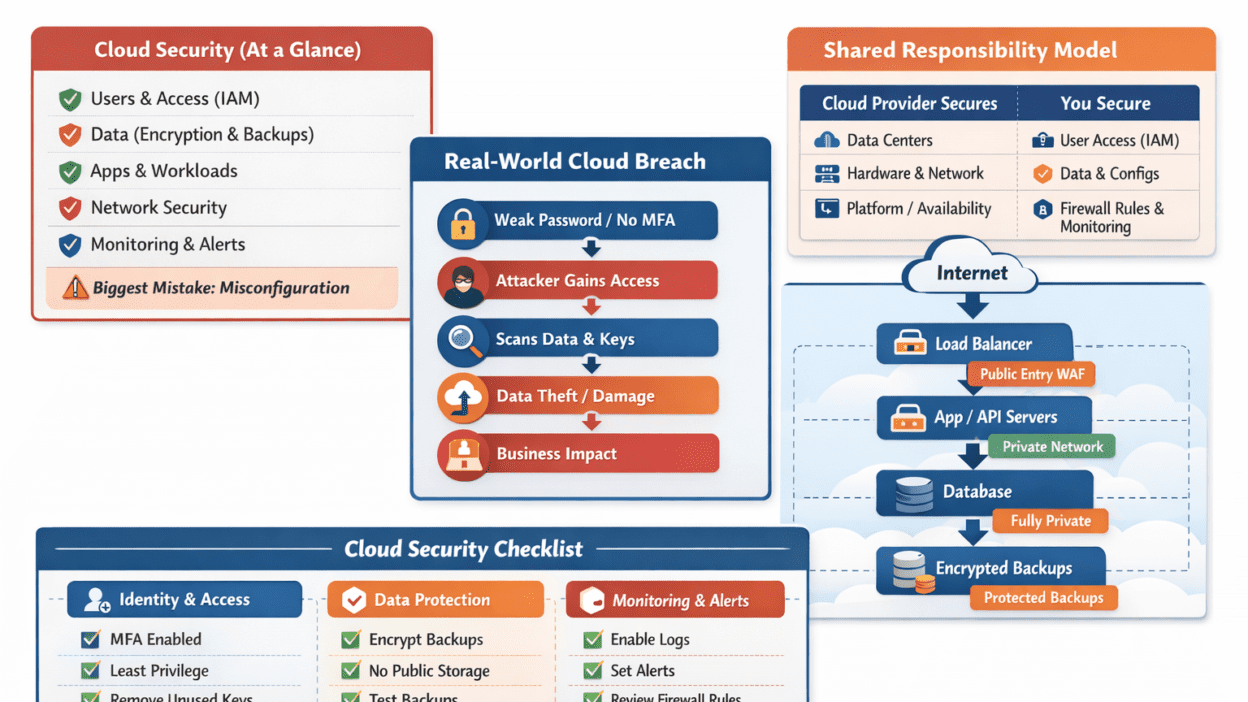
Cloud computing has transformed how individuals and organizations store data, run applications, and scale services. Whether it’s hosting websites, storing files, powering mobile apps, or running enterprise workloads, the cloud offers speed, flexibility, and cost benefits.
But there’s one critical challenge: security.
A single cloud mistake—like leaving a storage bucket public, using weak credentials, or skipping monitoring—can lead to data leaks, ransomware attacks, compliance fines, or service downtime.
The good news? Cloud security isn’t “too complex.” It’s a skill + habit. If you learn the basics and apply simple practices daily, you can stay ahead of most risks.
This guide is designed for beginners and professionals and will help you:
- Understand cloud security clearly
- Learn real-world cloud risks
- See simple infographic diagrams
- Apply best practices used by professionals
- Use a daily/weekly checklist to protect cloud environments
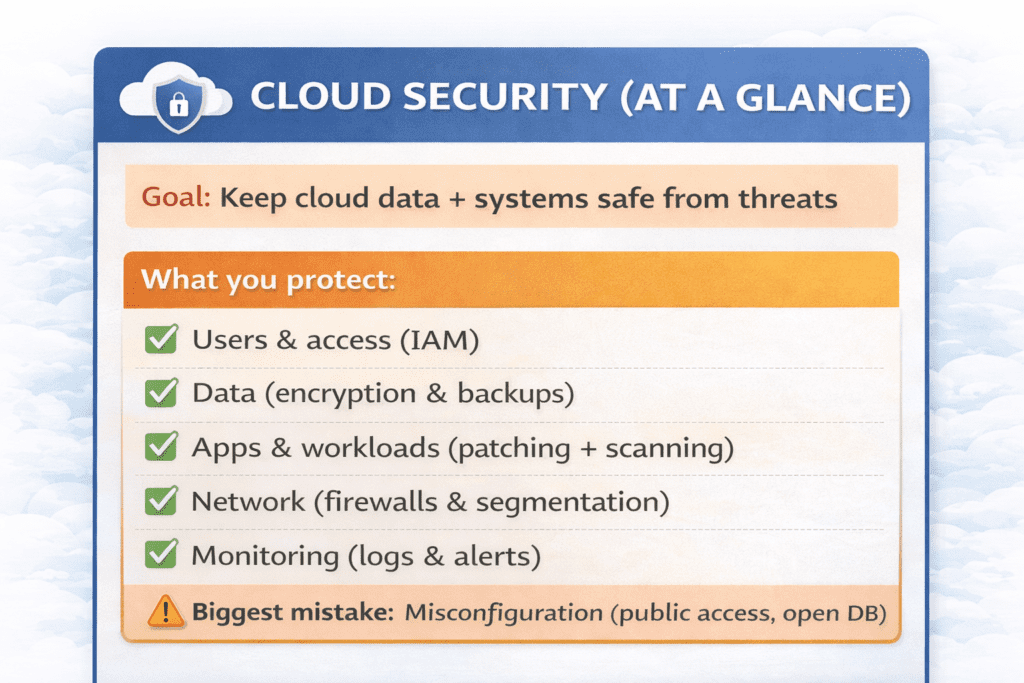
Table of Content
What Is Cloud Security? (Beginner-Friendly Explanation)
Cloud security refers to the practices, tools, and controls used to protect cloud services, systems, and data from threats like unauthorized access, breaches, data loss, and misconfigurations.
In traditional on-prem environments, companies manage physical servers, networks, and security devices themselves. In cloud environments, infrastructure is hosted by cloud providers—yet the customer still controls what they deploy and how they secure it.
Cloud security typically includes:
- Identity & Access Management (IAM)
- Data protection (encryption and backups)
- Network security (firewalls, segmentation)
- Monitoring and incident response
- Compliance and governance
The Shared Responsibility Model (Most Important Concept)
One of the biggest misunderstandings in cloud security is assuming:
“The cloud provider handles all security.”
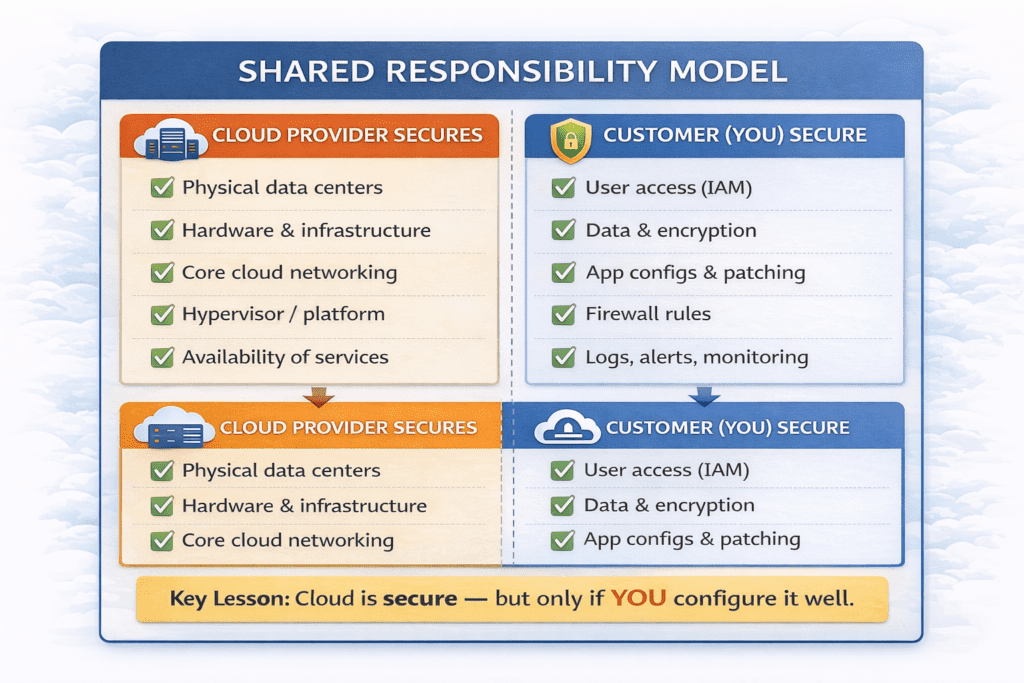
In reality, cloud security follows a Shared Responsibility Model:
Providers secure the cloud infrastructure
Customers secure their data, access, and configurations
Shared Responsibility Model Infographic
Real-World Cloud Security Examples (What Actually Happens)
Cloud breaches often aren’t “movie-style hacking.” They are usually caused by simple mistakes.
Example 1: Public Storage Bucket Leak
A developer creates cloud storage for testing and accidentally enables public access.
Result:
- sensitive files become publicly accessible
- attackers scan the internet for exposed storage buckets
- data gets leaked or indexed
Lesson: Always verify storage permissions—never assume “private by default.”
Example 2: Stolen Credentials + No MFA
An employee uses the same password in multiple places. A leak from a different website exposes the password.
Attackers then:
- log into cloud accounts
- steal sensitive data
- create costly resources
- delete critical files
Lesson: MFA + strong passwords stop most credential-based attacks.
Example 3: Ransomware + Deleted Backups
Attackers access cloud accounts and delete backups first. Then they encrypt systems.
Lesson: Backups must be isolated, protected, and tested
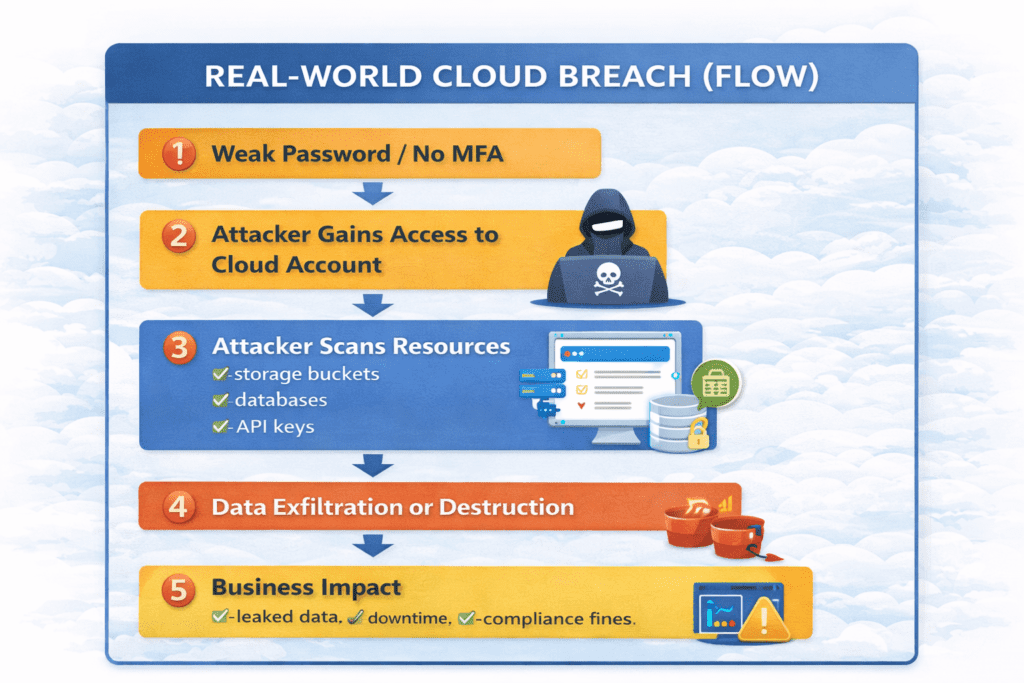
Real-World Cloud Breach Flow
Top 7 Cloud Security Risks (and How to Avoid Them)
1) Misconfiguration (Risk #1)
Examples:
- public storage
- open databases
- overly permissive firewall rules
Fix:
- “deny by default”
- review permissions before deployment
- use posture management tools (CSPM)
2) Weak IAM (Identity & Access Management)
Examples:
- no MFA
- shared admin accounts
- long-term access keys
Fix:
- MFA for everyone
- least privilege
- roles instead of shared accounts
3) Lack of Encryption
Without encryption, stolen data is easier to exploit.
Fix:
- encrypt at rest (storage, database)
- encrypt in transit (TLS/HTTPS)
- rotate keys
4) Insecure APIs
APIs control cloud services. Weak API security can lead to breaches.
Fix:
- strong authentication and authorization
- rate limiting
- input validation
- logging
5) Poor Monitoring and Logging
Without monitoring, breaches may stay hidden for months.
Fix:
- enable audit logs
- create alerts for risky activities
- review logs regularly
6) Shadow IT
Employees may use unauthorized cloud apps.
Fix:
- approve tools officially
- track cloud usage
- educate teams
7) Insider Threats
Errors or misuse by employees can cause huge damage.
Fix:
- log actions
- restrict access
- review privileges frequently
Practical Cloud Security Best Practices (Beginner-to-Pro)
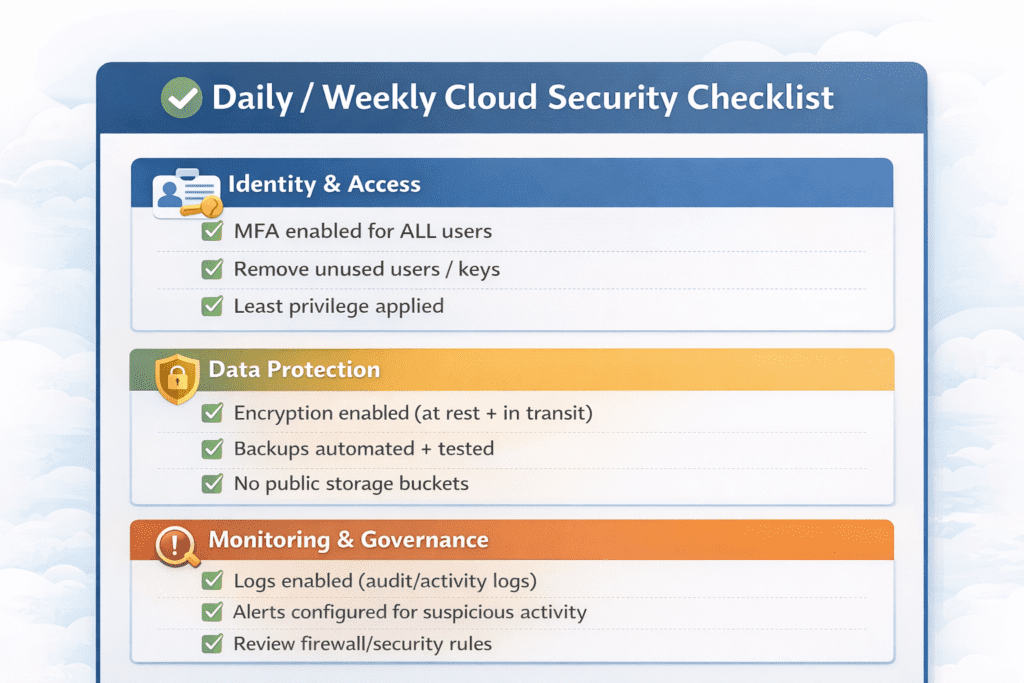
1) Enable MFA Everywhere (Non-Negotiable)
MFA is one of the easiest and strongest protections.
Beginner takeaway: turn it on today for any cloud login.
Professional takeaway: enforce it organization-wide.
2) Apply Least Privilege Access
Only give people access to what they need.
Example:
- developers shouldn’t have billing access
- support teams shouldn’t have database write access
3) Secure Network Exposure
Don’t expose everything publicly. Use:
- firewalls
- restricted admin panels
- private networks
- segmentation
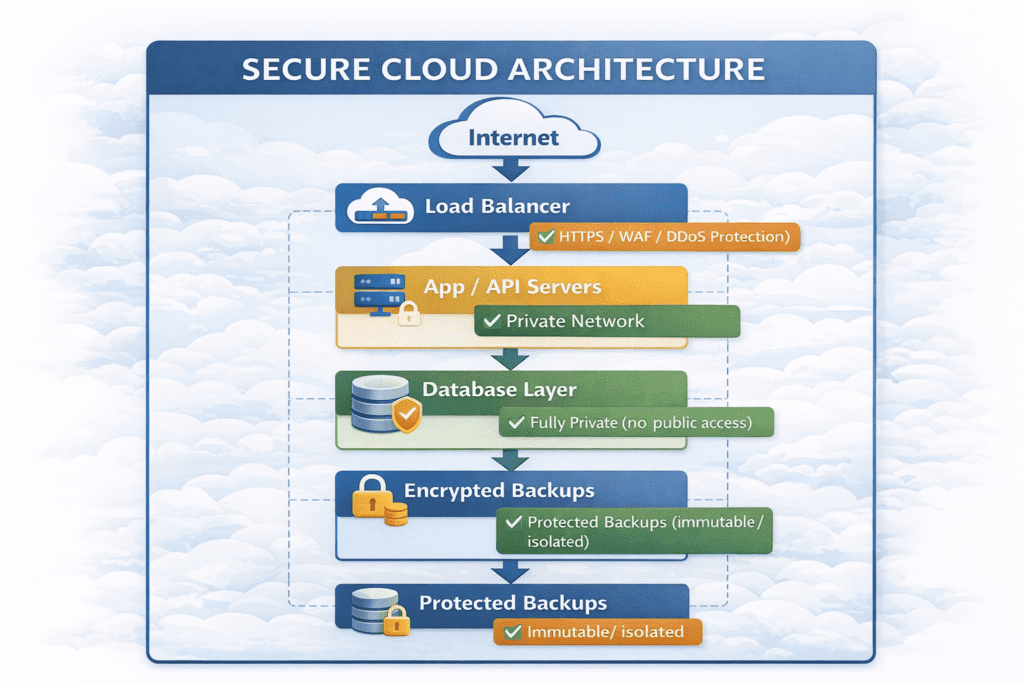
4) Encrypt Data (At Rest + In Transit)
Encryption should be standard:
- storage encryption
- database encryption
- TLS for connections
Backups + Disaster Recovery
Backups should be:
- automated
- encrypted
- protected by strict access
- tested regularly
6) Logging + Alerts
Set alerts for:
- admin privilege changes
- failed login spikes
- suspicious downloads
- public storage settings
7) Patch + Vulnerability Management
Cloud workloads still require patching.
Professional habit:
- automate updates
- run vulnerability scans
- remove unused assets
8) Zero Trust Mindset
Zero Trust means:
- verify access every time
- monitor continuously
- never assume trust
Frequently Asked Questions (FAQs) About Cloud Security
1) What is cloud security in simple words?
Cloud security means protecting your cloud data, apps, and accounts from threats like hacking, misconfiguration, and unauthorized access. It involves encryption, access control, monitoring, and safe configurations.
2) Is cloud security the responsibility of the cloud provider?
Not fully. Cloud security follows the Shared Responsibility Model.
The cloud provider secures the infrastructure, while you are responsible for securing your data, access, and configurations.
3) What is the biggest cloud security risk?
The biggest risk is misconfiguration, such as:
public storage buckets
open databases
weak access permissions
These mistakes can lead to data exposure quickly.
4) How can beginners start learning cloud security?
Beginners should focus on:
understanding the shared responsibility model
learning IAM basics
enabling MFA
keeping storage private
learning encryption and backups
Start small and build practical habits.
5) What is IAM and why is it important?
IAM (Identity and Access Management) controls:
who can access cloud services
what permissions they have
what actions they can perform
Weak IAM is one of the fastest ways attackers get into cloud accounts.
6) What does “least privilege” mean in cloud security?
Least privilege means:
✅ give users only the access they need
❌ don’t give full admin access unless necessary
This reduces damage if an account is compromised.
7) Do I really need MFA for cloud accounts?
Yes. MFA blocks most attacks caused by stolen passwords.
It’s the highest-impact, easiest security improvement you can make.
8) What are the best cloud security practices for professionals?
Professionals should focus on:
logging and monitoring
automated policy enforcement
vulnerability scanning
secure network segmentation
incident response planning
9) What is the difference between cloud security and cybersecurity?
Cybersecurity covers all digital security (devices, networks, apps).
Cloud security is a subset that specifically protects cloud environments and cloud-based services.
10) How often should cloud access and permissions be reviewed?
At minimum:
monthly for normal systems
weekly for high-risk environments
immediately when an employee leaves
Regular access review prevents permission creep.


